Atlas Repository
Find, filter, and download KPMP dataset files, including controlled-access data.
The Atlas Repository provides access to the dataset files being generated by KPMP. The datasets available in the repository are a combination of raw and processed data from KPMP participant biopsies and reference tissue samples. Datasets are routinely added as they are generated and have completed a quality control process. Some data files shown in the repository are "controlled access", meaning they can only be retrieved after a data use agreement is in place between KPMP and your organization. A summary of the data available in the repository is available on the Kidney Tissue Atlas homepage.
FILTERING
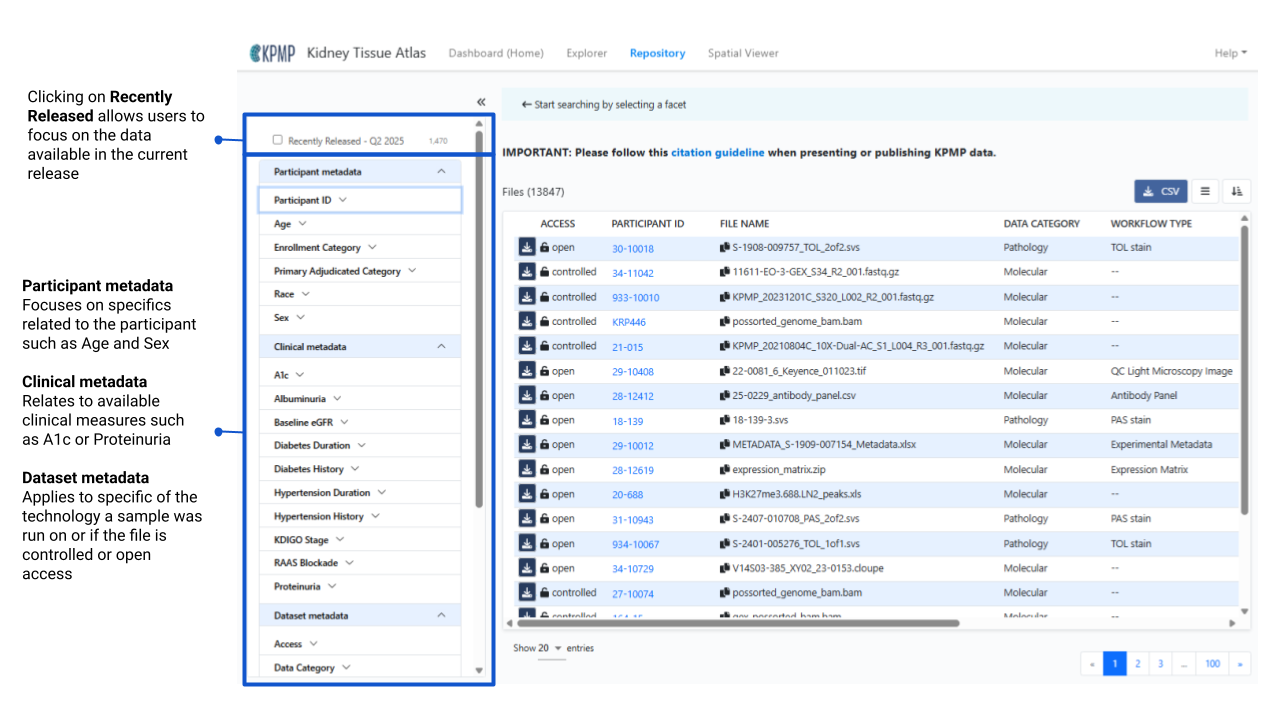
Users may immediately filter to the most recently released data packages by clicking the Recently Released - QX Year option at the top of the filtering panel. Additional filtering options are organized into three main sections:
- Participant metadata
- Clinical metadata
- Data set metadata
Within each section the options are organized alphabetically for ease of navigation.
Filtering Instructional Video (1:55)
PARTICIPANT METADATA
- Age: age is a binned value in the publicly available data
- Enrollment Category: The disease or reference study in which participants were enrolled into KPMP (AKI, CKD, DM-R, Healthy Reference). Other miscellaneous categories are based on non-KPMP sample disease categories.
- Primary Adjudication Category: The disease designation based on KPMP internal adjudication efforts
- Race: self-reported from KPMP participants
- Sex: sex at birth
CLINICAL METADATA
- A1c: reported as binned categories of percent
- Albuminuria: reported as binned categories in units of mg/g
- Baseline eGFR: reported as binned categories in ml/min/1.73m2. Baseline eGFR for AKI calculated with the race-free CKD-EPI equation using: 1) median of the last 1-3 outpatient serum creatinine measurements from day 7 to 365 prior to enrollment, or 2) imputed serum creatinine when there are no serum creatinine values available for 7 to 365 days prior to enrollment
- Diabetes Duration: Reported as binned categories in Years
- Diabetes History: Has your doctor or health care provider told you that you have diabetes? Responses: Yes, No, or Don’t know.
- Hypertension Duration: Reported as binned categories in Years
- Hypertension History: Has a doctor or other health care provider ever told you that you have high blood pressure or hypertension? Responses: Yes, No, or Don’t know.
- KDIGO Stage: Only for AKI participants. Maximum KDIGO stage by serum creatinine.
- RAAS Blockade: Yes or No on a RAAS Blockade. RAAS blockade is defined by the third level of ATC code from RxCUI: ace inhibitors, angiotensin ii receptor blockers, or aldosterone antagonists excluding Amlodipine, hydrochlorothiazide, chlorthalidone/triamterene, and Hydrochlorothiazide/Triamterene
- Proteinuria: reported as binned categories in units of mg
DATASET METADATA
- Access: Controlled or Open access. Controlled access requires a Data Use Agreement be put into place for KPMP to share this type of data. Please complete the Controlled Access Request for any controlled access data needs.
- Data Category: Biomarker, Clinical, Molecular, Pathology
- Data Format: KPMP data comes in various file formats, all available formats are listed here.
- Data Type:
- Biomarker data types: Biomarker Data, Metabolomics, Proteomics, Transcriptomics
- Clinical: Clinical Study Data
- Molecular: Epigenetics, Imaging, Proteomics, Transcriptomics
- Pathology: Imaging, Pathology Study Data
- DOIs: Any files currently associated with a DOI for a KPMP publication will be assigned to all associated DOIs
- Experimental Strategy: This is a list of all the available technologies KPMP samples have been run on to date.
- Platform: Technology platform name
- Protocol: Indicates which study protocol a sample was enrolled under: HRT Living Donor Protocol, HRT Percutaneous Nephrolithotomy Protocol, KPMP Main Protocol, KPMP Pilot 1 Protocol, KPMP Pilot1v2 Protocol, Other (non-KPMP) Protocol
- Sample Type: Not all samples come from the KPMP Main Protocol following our participant biopsy protocol. When initially establishing KPMP alternate sample types were included: Transplant Pre-perfusion Biopsy, Intra-operative Biopsy, Percutaneous Needle Biopsy, Intra-operative Needle Biopsy, Tumor Nephrectomy, Deceased Donor Nephrectomy, Partial Tumor Nephrectomy, Total Tumor Nephrectomy, Transplant Surveillance Biopsy, Biopsy
- Tissue Source: identifies, at a high level, the place a specific tissue was supplied. The KPMP main study samples are sourced from KPMP recruitment sites or KPMP Healthy Reference Sites. Additional tissue has been supplied by DiaComp (Diabetic Complications Consortium), KPMP Tissue Interrogation Sites, or KPMP pilot tissue supplied by KPMP nephrectomy tissue from the University of Michigan.
- Workflow Type: additional detailed information coming from the Experimental Strategy. For example, Light Microscopic Whole Slide Images as an Experimental Strategy is made up of multiple stain types: Frozen H&E stain, H&E stain, PAS stain, SIL stain, TOL stain, TRI stain, and Other stain types.
Multi-select options from any of these sections will help users narrow down to a specific cohort of participants and only focus on the data types of interest.
USING THE DATA TABLE
The data table shows the list of data available in the Atlas Repository based on the selected filtering options.

DATA TABLE COLUMN HEADERS
- *Access: indicates if files are open or controlled access. Open access files may be downloaded directly from the Atlas Repository. Controlled access files require a Data Use Agreement to be in place with the user’s institution and KPMP.
- *Participant ID: KPMP identification used to align data on the participant level.
- File UUID: a Universally Unique Identifier (UUID) randomly generated to keep all files unique.
- *File Name: name of the file or package generally created at the data generation site.
- *Data Category: there are currently 4 distinct types of data categories: Biomarker, Clinical, Molecular, Pathology
- *Data Format: File format of the data or the files within a data package, some examples include: fastq, bam, xlsx docx pdf
- Data Type: File format of the data or the files within a data package, some examples include: fastq, bam, xlsx docx pdf
- Data Type: a subset of the Data Categories: Biomarker Data, Clinical Study Data, Epigenetics, Imaging, Metabolomics, Pathology Study Data, Proteomics, Transcriptomics
- *DOIs: Specific sets of data found in our DOI Collection.
- Experimental Strategy: available technologies or analysis from KPMP data generators such as Single-cell RNA-Seq, Pathology Descriptor Scoring, Spatial Transcriptomics.
- *Platform: platform a given technology was run on
- Protocol: protocols participants were enrolled under to be part of the KPMP Atlas
- Workflow: more granular details or specific sets of data or analysis for each technology.
- *Size: the actual size of the data file.
*Column headers that are the default in the Atlas
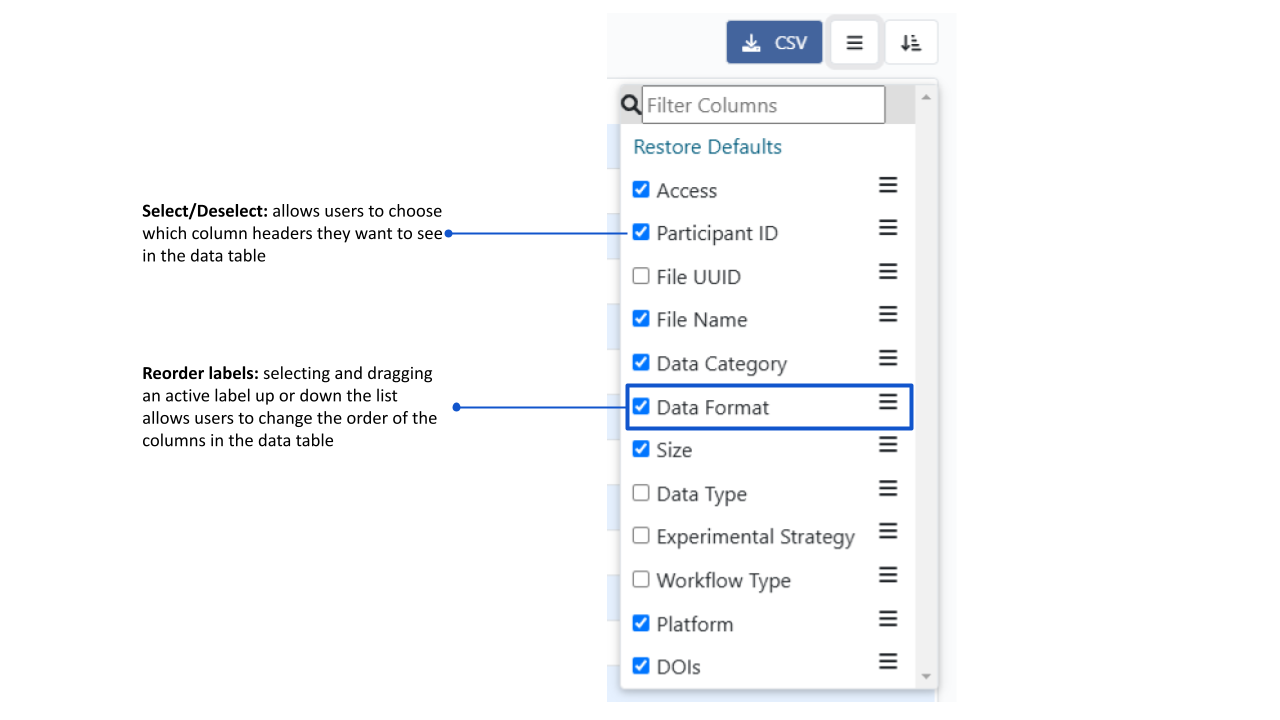
DOWNLOAD CSV
Once a discrete list of files has been created based on a user’s specific filtering criteria, a csv format list can be downloaded and used for informing data requests, internal tracking, etc.